


Is a Ford F-350 Tesla Screen the Best Infotainment Upgrade?
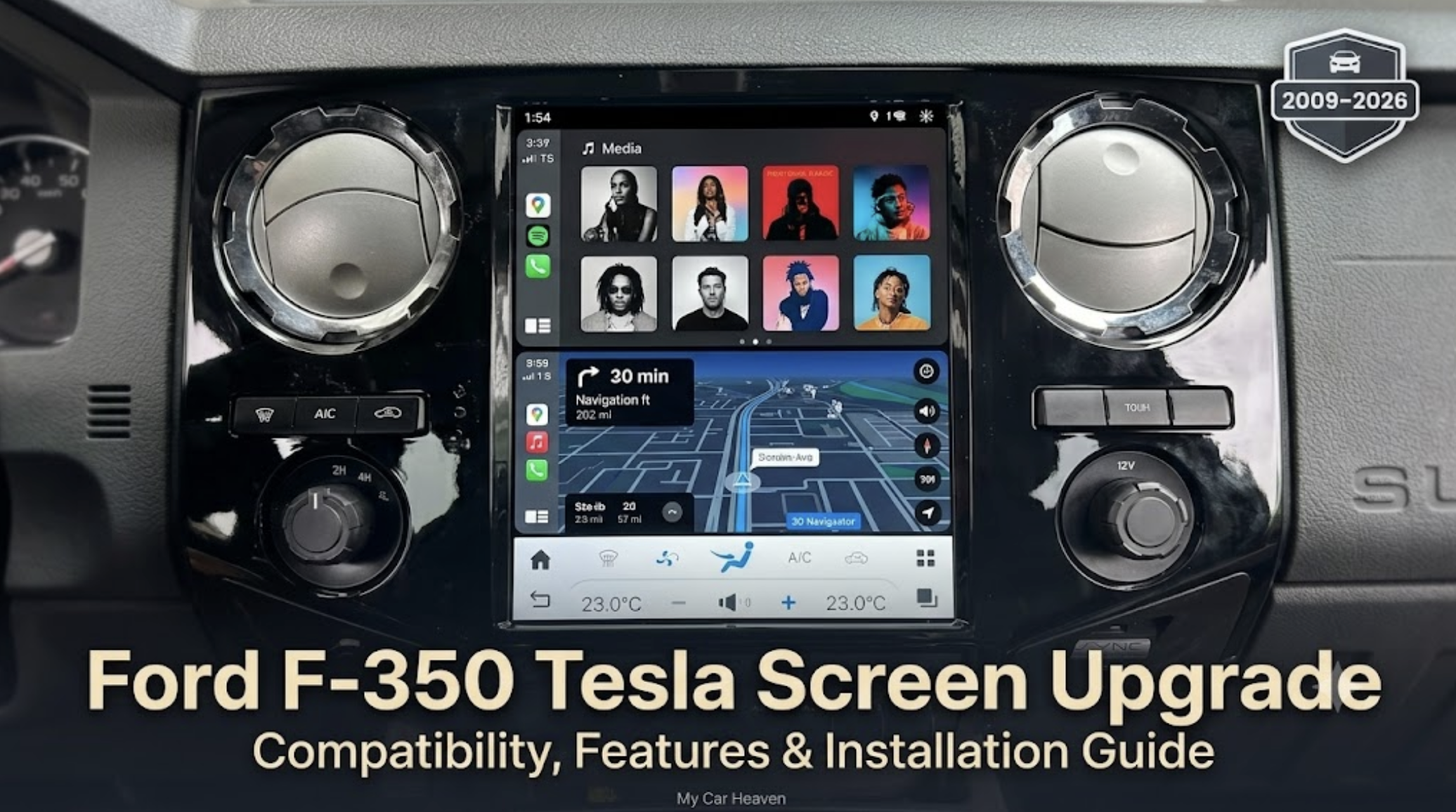
A Ford F-350 Tesla screen can be a worthwhile upgrade for owners who want a larger touchscreen. In addition, it can add Apple CarPlay, Android Auto and modern navigation apps. As a result, owners can enjoy a more contemporary dashboard without replacing their truck.
The most important step is confirming compatibility with the truck’s model year, factory radio, climate-control panel, cameras and optional equipment. Merge Screens lists its Ford F-350 Tesla screen for 2009–2026 trucks, but the company performs an additional photo-based compatibility check after purchase.
Choose the 12.1-inch standard screen if value and everyday functionality are the priorities. Consider the 14.5-inch premium version if display size, resolution, storage and faster hardware matter more.
Why Upgrade the Ford F-350 Infotainment System?
Ford designed the F-350 to remain useful for many years. In fact, its towing ability, payload capacity and heavy-duty construction can keep it working long after its original infotainment system starts to feel dated.
That creates an unusual ownership problem. The truck may still perform exactly as required, yet the dashboard may lack the connectivity and interface drivers now expect.
An aftermarket vertical screen addresses the technology gap without asking the owner to replace an otherwise capable vehicle. Instead of accepting a small factory display, limited phone integration or ageing navigation, an owner can add a larger touchscreen designed to work with modern mobile devices.
A Tesla-style screen is not simply about making the dashboard look newer. Instead, its practical value comes from placing navigation, audio, calls, vehicle settings and compatible apps within one larger interface.
For example, for F-350 owners who spend long days on the road, travel between job sites or tow over unfamiliar routes, that convenience can make the cabin more useful.
What Is a Ford F-350 Tesla Screen?
For example, an aftermarket Ford F-350 Tesla-style screen features a vertically oriented infotainment display. In addition, it takes inspiration from the large central screens found in modern electric vehicles.
It replaces the truck’s existing radio or display assembly with a significantly larger touchscreen. Depending on the selected configuration, the system may also provide access to Apple CarPlay, Android Auto, navigation, music, Bluetooth calling and Android-based applications.
The Merge Screens Ford F-350 Tesla screen is offered in 12.1-inch and 14.5-inch versions. Both use an Android operating system and are intended to retain important factory functions when the correct configuration is installed.
The aim is not to turn an F-350 into a Tesla. It is to combine the strengths of a heavy-duty Ford truck with a more modern digital interface.
Ford F-350 Tesla Screen Features at a Glance
| Feature | Practical benefit |
| Large vertical touchscreen | Provides more space for maps, menus and vehicle controls |
| Apple CarPlay | Gives compatible iPhone users access to navigation, music, messages and calls |
| Android Auto | Connects compatible Android phones to supported driving apps |
| Built-in Android system | Allows the screen to operate as a standalone smart interface |
| Factory-control retention | Helps preserve steering-wheel buttons, climate settings and other supported functions |
| Factory camera integration | Allows the existing reversing camera to remain part of the system when compatible |
| Bluetooth connectivity | Supports calls and wireless audio through the upgraded interface |
| Wi-Fi, hotspot or SIM connectivity | Provides several ways to connect the screen to the internet |
| Expandable camera support | May support additional aftermarket camera configurations |
| Software updates | Helps maintain features and compatibility over time |
Features can vary according to the model year, original equipment and selected screen. Owners should treat compatibility confirmation as essential rather than assuming that every feature will operate identically in every F-350.
Standard 12.1-Inch or Premium 14.5-Inch Screen?
Mergescreens offers two principal configurations for the F-350. However, the best choice depends on how the truck is used and, ultimately, what the owner expects from the upgrade.
| Specification | 12.1-inch standard screen | 14.5-inch premium screen |
| Display size | 12.1 inches | 14.5 inches |
| Resolution | 1024 × 768 | 1920 × 1200 |
| Operating system | Android 13 | Android 13 |
| Memory | 4GB RAM | 8GB RAM |
| Storage | 64GB | 128GB |
| Audio output | 4 × 45W with equalisersettings | 4 × 45W with equaliser settings |
| Best suited to | Everyday connectivity and value | Maximum display size and stronger hardware |
Who Should Choose the 12.1-Inch Version?
The standard screen is likely to suit owners who mainly want dependable access to phone integration, navigation and audio controls.
Its 4GB of memory and 64GB of storage should be adequate for routine infotainment tasks. It also provides a substantial visual upgrade over many older factory radios without making screen size the only priority.
This configuration makes the most sense when:
– Apple CarPlay or Android Auto is the main reason for upgrading.
– The owner primarily uses navigation and music apps.
– A larger display is wanted without choosing the highest specification.
– Budget matters more than maximum processing power.
– The truck is used for work and needs a practical, straightforward interface.
Who Should Choose the 14.5-Inch Version?
The premium model is aimed at owners who want the biggest visual transformation.
Its higher-resolution display can make maps, menus and compatible camera views easier to see. The additional RAM and storage should also provide more headroom for multitasking and Android applications.
The premium screen is the stronger choice when:
– The owner wants the largest available display.
– High-resolution graphics are important.
– Several apps will be installed or used regularly.
– The truck has a customised or premium interior.
– The owner plans to keep the vehicle for several more years.
– The additional cost is justified by frequent daily use.
For many buyers, the decision is less about whether the larger screen looks better and more about whether its added memory, storage and resolution will be used.
Will a Tesla Screen Fit Every Ford F-350?
Not automatically.
The product is listed for Ford F-350 model years from 2009 through 2026, but a year range alone does not confirm complete compatibility. Ford changed dashboard layouts, factory radios, infotainment systems, trim packages and control panels across those years.
Two F-350s from the same year may also have different equipment. One may have a basic radio, while another has a factory touchscreen, premium audio, multiple cameras or digitally controlled climate functions.
Merge Screens states that it requests photographs of the existing radio and climate-control panel after purchase. Those images are used to identify the appropriate configuration and check whether the new screen can communicate with the truck’s original systems.
Before ordering, gather the following information:
– Exact model year
– Trim level
– Current radio or infotainment system
– Photograph of the complete dashboard
– Photograph of the climate-control panel
– Factory amplifier or premium audio details
– Reversing-camera configuration
– Additional factory cameras
– Heated, ventilated or massaging seat controls
– Factory navigation
– Steering-wheel control layout
– Any previous aftermarket wiring or audio modifications
This process is particularly important for trucks that have already received a radio, amplifier, camera or speaker upgrade.
Which Factory Functions Can Be Retained?
A well-integrated infotainment upgrade should do more than display phone apps. It should continue communicating with the systems the driver already uses.
Depending on the truck and configuration, the Merge Screens unit is designed to retain functions such as:
– Steering-wheel controls
– Factory reversing camera
– Climate controls
– Factory and aftermarket audio systems
– Heated or massaging seat controls
– Ambient-lighting settings
– Existing vehicle Wi-Fi
– Original factory-screen interface
– Compatible factory buttons
– XM Radio through the relevant app or service
The ability to switch between the Android-based interface and the factory system is especially useful. It gives the owner access to the modern screen while keeping the original interface available for certain settings.
However, buyers should not assume that every optional feature will be retained without checking. An F-350 equipped with a specialist camera system, premium amplifier or uncommon factory package may require additional configuration.
Does It Add Apple CarPlay and Android Auto?
Yes. Smartphone integration is one of the main reasons owners consider this upgrade.
Apple CarPlay allows compatible iPhone users to access supported functions such as Apple Maps, Google Maps, Waze, music, calls and messages through the dashboard screen. Android Auto provides similar access for compatible Android phones.
Ford’s own SYNC 3 support information explains how factory-equipped SYNC systems connect phones, Bluetooth audio and supported applications. However, a Tesla-style aftermarket screen can serve owners whose current system lacks the desired features or whose factory display feels too limited.
Wireless availability and audio routing may vary by configuration. Buyers should confirm whether their selected unit supports wired connectivity, wireless connectivity or both.
Internet access can typically come from:
– A Wi-Fi network
– A mobile-phone hotspot
– A compatible SIM card
Drivers should configure apps before beginning a journey and use only functions that can be operated safely. Video streaming and other distracting content should be reserved for parked use or passengers where legally permitted.
Is the Ford F-350 Tesla Screen Plug and Play?
The system is designed around a plug-and-play installation approach. As a result, in most applications, the supplied wiring loom connects to the truck’s factory plugs without the need to cut or splice the original harness.
That is a major advantage. Avoiding unnecessary modifications can make installation cleaner and may simplify returning the truck to its original configuration.
However, “plug and play” should not be interpreted as “effort-free.”
The installer may still need to:
1. Disconnect the battery safely.
2. Remove dashboard trim without damaging clips.
3. Remove the factory radio and control assembly.
4. Identify each factory connector.
5. Connect the supplied harnesses and interface modules.
6. Transfer or position relevant components.
7. Route USB, microphone, antenna or camera connections.
8. Test audio and vehicle functions before reassembly.
9. Configure the screen for the truck.
10. Refit the dashboard panels correctly.
Some vehicles may require minor additional wiring, especially when unusual factory equipment or previous aftermarket modifications are present.
DIY Installation or Professional Installation?
There are three practical installation routes.
However, a confident owner with automotive electrical experience may be able to install the screen using the supplied instructions, installation video and technical support.
DIY installation can reduce labour costs, but it is best suited to someone who already understands dashboard disassembly, automotive connectors and basic troubleshooting.
It may be the right choice when:
– The truck has not been heavily modified.
– The owner has installed radios or accessories before.
– Suitable trim-removal tools are available.
– There is enough time to test every function carefully.
– The owner is comfortable asking technical support for assistance.
A professional installer is the safer option for most owners.
Merge Screens advertises access to certified installers familiar with its products. The company currently indicates a scheduled professional installation may cost approximately $350–$450, although the final amount can depend on location and vehicle complexity.
Professional installation is advisable when:
– The truck has premium factory audio.
– Multiple factory cameras are installed.
– The dashboard contains uncommon controls.
– Previous owners modified the wiring.
– The owner cannot afford extended vehicle downtime.
– Warranty accountability is important.
A mobile installation service may also be available in supported areas. In that case, an installer travels to the owner and performs the work at the vehicle’s location.
This is the most convenient option, although availability and pricing should be confirmed before purchase.
Things You Should Know Before Buying
The Factory System Must Still Work
The upgrade connects to parts of the truck’s original system. Therefore, it should not be purchased as a repair for a completely failed factory radio, a defective amplifier or a damaged vehicle network.
A cracked display may not prevent installation if the underlying system still operates. A non-functioning factory system is a different problem and should be diagnosed first.
Compatibility Is More Important Than Screen Size
A 14.5-inch display may be appealing, but it is not the right purchase unless the correct version supports the truck’s equipment.
Confirming the dashboard layout, climate controls, audio system and camera arrangement should come before choosing the larger screen.
Retained Does Not Always Mean Unchanged
A factory feature may remain available but operate through a different menu or interface. Owners should ask where climate, seat, camera and audio settings will appear after installation.
Internet Access May Require a Separate Connection
The Android operating system needs internet access for live services. That may come from a phone hotspot, Wi-Fi network or compatible SIM plan.
Apple CarPlay and Android Auto can still provide many phone-based features, but the screen’s standalone Android applications may need their own data connection.
A Large Display Requires Responsible Use
A larger screen makes maps and controls easier to see, but it can also display more information. Drivers should arrange shortcuts, notifications and menus to minimise distraction.
Product Claims Should Be Matched to the Exact Truck
The available customer videos include several Ford F-Series configurations, including F-250, F-350 and F-150 installations. These examples can demonstrate the general interface and appearance, but the most useful reference will be an installation involving the same model year and a similar factory dashboard.
What Do Ford F-Series Owner Reviews Show?
The product page contains video-based customer stories covering several Ford F-Series trucks. The listed examples include F-350 installations from model years such as 2018, 2019, 2020 and 2022.
Video reviews can be more useful than short written ratings because they may show:
– How the display fits within the dashboard
– How quickly menus respond
– Whether the factory camera activates correctly
– How climate controls are presented
– The way Apple CarPlay fills the screen
– How the system looks in daylight
– How the installation changes the cabin
– Whether factory steering-wheel controls continue working
Prospective buyers should look for a review involving a truck close to their own model year. They should also pay attention to what the video does not show.
For example, a demonstration of music and navigation does not necessarily confirm compatibility with a specific premium amplifier, massaging-seat package or multi-camera towing system.
Main Advantages and Potential Drawbacks
| Advantages | Potential drawbacks |
| Dramatically modernises an older dashboard | Costs more than a basic double-DIN radio |
| Adds Apple CarPlay and Android Auto | Compatibility requires careful verification |
| Offers a much larger navigation display | Some factory functions may move into digital menus |
| Can retain important factory controls | Installation may be too complex for beginners |
| Available in two hardware levels | Android apps may require a hotspot or SIM connection |
| Can preserve the original interface | Large screens can be distracting if poorly configured |
| Supported by installation resources | Modified trucks may require extra troubleshooting |
| May help extend the useful life of the truck | It cannot repair an already failed factory system |
Is the Upgrade Worth the Cost?
The screen begins at a significantly higher price than a conventional aftermarket radio, so value depends on how long the owner plans to keep the truck and how often the system will be used.
It may be worth the investment when the F-350 is mechanically sound, suits the owner’s towing or work requirements and is expected to remain in service for several years.
Replacing the entire vehicle simply to gain better infotainment would usually cost far more. A modern screen can refresh the part of the truck the driver interacts with every day while preserving the capability that made the F-350 worth keeping.
The upgrade is particularly compelling for owners who:
– Regularly use phone navigation
– Want a larger reversing-camera view
– Spend several hours per week in the truck
– Need hands-free calls and audio
– Dislike mounting a phone on the windscreen
– Want to modernise a customised interior
– Plan to retain the vehicle long term
It may be less suitable for owners who rarely use infotainment features, prefer physical controls or expect to sell the truck soon.
How to Choose the Right Ford F-350 Screen
Use this buying process before placing an order:
1. Confirm the Truck’s Existing Equipment
Record the model year, trim, factory radio, audio package, camera equipment and climate-control arrangement.
Take clear, well-lit photographs of the radio, climate panel and surrounding dashboard. Include any factory buttons positioned around the screen.
3. List Previous Modifications
Disclose aftermarket amplifiers, cameras, remote starters, radios or wiring repairs. Hidden modifications are a common source of installation problems.
4. Decide Which Features Matter Most
Prioritise the functions that will actually be used. Navigation, CarPlay, Android Auto and camera visibility may matter more than running numerous Android applications.
5. Select the Screen Specification
Choose the 12.1-inch version for essential modern functionality and value. Choose the 14.5-inch version for higher resolution, additional memory, more storage and maximum visual impact.
6. Choose an Installation Route
Be realistic about technical ability. Paying for professional installation can be less expensive than repairing damaged trim, connectors or electrical systems.
7. Confirm Support and Warranty Terms
The product currently includes a one-year manufacturer warranty, a 90-day return guarantee and lifetime software updates, subject to the seller’s applicable terms and policies.
Final Verdict: Is This the Best Upgrade for Your F-350?
For the right owner, a Ford F-350 Tesla screen is one of the most transformative interior upgrades available.
It does not increase towing capacity or engine performance, but it modernises the part of the truck used on every journey. A larger display, smartphone integration, navigation and retained factory controls can make an older F-350 feel substantially more current.
The 12.1-inch system is therefore the sensible choice for owners focused on core connectivity. By contrast, the 14.5-inch premium version is better suited to those who want the largest screen, sharper resolution and stronger internal hardware.
However, compatibility remains the deciding factor. After all, the best screen is not simply the biggest one; instead, it is the version correctly configured for the truck’s model year, dashboard, climate controls, cameras and audio equipment.
For owners considering an upgrade, therefore, the available specifications, installation options and F-Series customer demonstrations are all available on the Ford F-350 Tesla screen product page.
When correctly matched and professionally configured, the upgrade offers a practical way to bring modern infotainment into a heavy-duty truck that may still have many years of work and travel ahead.


Read more on
MyCarHeaven are on Instagram. Go check us out and do follow us.
Go visit the MyCarHeaven Instagram page. We post regular quality content, predominantly focused on classic cars, supercars, hypercars and car shows. We also feature all our competitions here, where you will have the chance IF YOU FOLLOW US and you follow the competition entry criteria, you could be in with a chance of winning tickets to the best UK car shows, and other automotive stuff.
Go to the MyCarHeaven Instagram account here. Advertisement
 Advertisement
 Advertisement
 Advertisement